Saturday, 25 August 2018

Outdoor Amcrest Security Cameras: Where to Put Them?


Generally, a camera must be strategically placed in a position that gives it a clear, unobstructed view of the area you want to monitor.  

Amcrest


However, if your aim is to prevent thieves from intruding into your home or office or to see their faces, check out some statistics from the International Association of Certified Home Inspectors. 

The InterNACHI found that around 8 out of 10 burglars enter through the first door, while more than 3 out of 10 enter through the front door.  Around 23% of thieves gain access through a window on the first floor, while another 22% enter through the back door.  Other points of entry are the garage (9%), basement and unlocked entrances (4% each), storage areas (2%), and any opening on the second floor (2%).  In the United States, about 4 burglaries occur every minute; that’s about one every 15 seconds.

If you have limited resources, installing outdoor Amcrest security cameras allows you to monitor your front door, first door, first floor windows and backdoor – as these are the points of entry that burglars are more likely to target. It’s also a great idea to place a security camera on your front door to be able to see who's knocking without having to open it.

According to Alina Bradfrod at CNET.com, outdoor cameras should be placed above the window or door frames and angled downwards, making sure the window or door area and the few feet surrounding it, are visible.  Ensure there are no blind spots where burglars can hide and stay out of the camera view as they make their way further inside the house. 

Also, check your camera's focus range.  There are cameras that have limited focus range of 45 degrees to 75 degrees.  These cameras should be trained specifically on the area you want to monitor, for instance, right at your front door.  Other cameras have a wider range and can monitor anywhere from 75 degrees to 180 degrees.  Place these cameras in areas where there are no obstructions and can keep watch over a larger area.  Better yet, get an outdoor security that rotates as it gives you the chance to view a larger coverage area.

Most importantly, keep your outdoor Amcrest security cameras out of reach.  That way an intruder would not be able to smash your camera.  A good height to place your cameras at is around 10 feet or higher, making it difficult for most people to reach and smash your camera. 

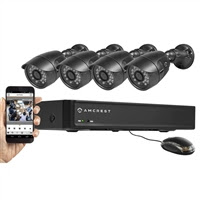
Amcrest DVR & Camera

The Amcrest security 650 TVL Professional Video Security System: Simple, Reliable, Secure. Record professional quality widescreen video through four high resolution cameras, which you can manage along with recordings almost effortlessly: the DVR's robust yet simple software interface makes this system a paragon of friendly engineering.


Amcrest

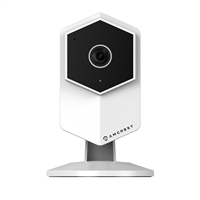
Amcrest Hex WiFi Video Monitoring Security Camera

The Amcrest security Hex 3MP Wi-Fi video camera helps you stay in touch with what you love anytime, anywhere. With its quick and easy mobile setup process, you will have secure access to your camera's video stream in no time. Stream live and playback recorded video of your home, your kids, your pets, or your business on the go with the Amcrest View app. Amcrest Cloud offers optional cloud recording with free live viewing and 4 hours of free video storage accessible from any device including Apple Mac, Windows PC, iPhone, iPad or Android devices. Amcrest cameras also record to an internal MicroSD card (not included) as well as to any Amcrest Network Video Recorder (NVR) (not included). Each Amcrest camera features two-way talk, night vision, enhanced digital zoom, a 135 viewing angle, smart motion alerts, advanced recording options, secure SSL/HTTPS connection and AES encryption. With the Amcrest camera, you'll never be out of the loop again.

Amcrest

Top Benefits of a WiFi Camera


With the ease of technology in todays’ age, there is nothing more bothersome than having to hook up a camera to your computer. There is no need to hook up a camera to a computer with the ease of a WiFi camera. There are wide variety WiFi cameras that are available from Amcrest security for all of your security camera needs. 

Amcrest


Why Choose a WiFi Camera

A WiFi camera makes it possible to transfer photos wirelessly from a digital camera to your computer. Just think, you can email photos and videos that you have taken on your WiFi camera while you are still on vacation. If you want the resolution to stay as good as possible and want a wired connection, you can easily still use a wired connection at any time. With the use of a WiFi camera, you can even set them up so where things will automatically be downloaded onto your computer.

Benefits of WiFi Cameras

The main benefit you are going to get out of a WiFi camera as compared to regular digital cameras is that you are not going to have to deal with the cords and having to physically hook the camera up to your computer and download your items. With the ease of a WiFi camera, you can easily download all of your items from the camera to your computer with the touch of a simple button. Believe it or not, there are other benefits you are going to get out of a WiFi camera which include: 

·         Quick access to storage

·         Ability to share things with one simple step 

·         You can set your WiFi camera up so that items are deleted once they have been downloaded to your computer 

Downfalls of WiFi Cameras

WiFi cameras are not reliable when it comes to maintaining battery power when they are connected to the Internet. So, if you have them connection to the Internet, make sure that you have a power source readily available. Another downfall with a WiFi camera is that you must make sure that you have a place to connect to and if the connection is not strong, the items may not download correctly. If security and privacy are important to you, you also need to be careful when letting the items automatically be download in public areas, such as a library or coffee shop. Even though there are some downfalls with WiFi cameras, they are definitely the way of the future.

WiFi Video Cameras

Photo cameras are not the only camera types to use WiFi technology. Many different webcams and security cameras use the technology of WiFi as well. You can literally be on vacation and be able to see the videos of your home’s security system. You can simply log into your home’s computer and check the videos out. You can place the WiFi camera in hidden areas of your home without wires and be able to see everything that is going on in and around your home. Many of the WiFi cameras even come with a feature where you will receive an e-mail or text message when the camera senses any type of motion.

Friday, 24 August 2018

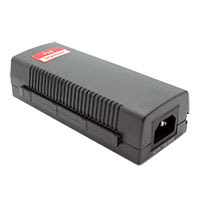
Amcrest Foscam Active POE Injector

Amcrest
Active POE Injector compatible with all Foscam Amcrest security IP Cameras The Active PoE Injector allows for POE power when a POE switch is not available. Generating up to 15.4W, the POE Injector supplies remote power for products such as wireless access points, Foscam IP cameras and videophones. It can work with 10/100Base-T networking devices and emerging 1000Base-T devices such as Wi-MAX and wireless IEEE 802.11n access points.

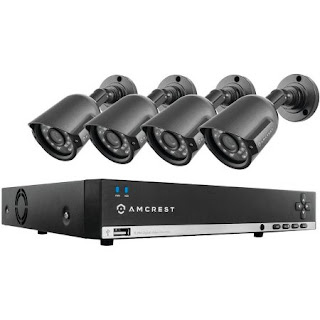
Amcrest AMDV960H8-4B 960h 8-Channel 1TB DVR Security System

The Amcrest AMDV960H8-4B 960h 1TB 8-Channel DVR Security System provides professional grade quality at an affordable price. The technology sets the standard providing high-quality wide-screen video using advanced image sensors, allowing you to view images that are 34 percent larger than D1 resolution. The durable Amcrest security system has 4 800+ TVL bullet cameras for good video quality and clarity. They view and record in widescreen with remote viewing on Apple iPad/iPhone and Android devices via the Amcrest link app allowing you to stay connected. The eight-channel security system is pre-installed 1TB hard drive (expandable up to 3TB) for six days continuous recording at highest resolution. It is weatherproof (IP66) for indoor or outdoor use. The high-quality Amcrest SMDV960H8-4B 960h 1TB 8-channel DVR security system has a 984' transmission distance from camera to DVR.

Having a security system will help give you the peace you mind you need and help you keep your family and home safe and protected.

Amcrest

Keeping Kids Safe with Babysitters


Do you really know how safe your kids are when your babysitter is watching them in your home? This question is a very real for many people that have kids. One way to make sure your children are safe with your babysitter is by the use of an IP camera in your home. You can find a wide variety of these IP cameras from Amcrest security.

Amcrest


Types of IP Cameras

There are many different IP cameras that can be chosen from. The five different types of IP cameras include:
  • Decentralized and centralized IP cameras
  • Wired and wireless IP cameras
  • Fixed and PTZ IP cameras
  • Day and night IP cameras
  • Megapixel IP cameras

Why Place the Cameras

It is a very good idea to place IP cameras around your house if you have a babysitter watching your child either for an all-day period or for shirt stints of time. You can never make your child too safe while they are in the care of others. Even if you completely trust the person that is caring for your child, you should still have an IP camera placed in your home for the safety of your children. Besides making sure that your child is safe while with the babysitter, you can also check on the things that the babysitter is doing with your child. For example, you may not always want the babysitter just sitting the children in front of the television for the entire day or you may not always want the babysitter sitting around the entire day and not working and playing with your children.

Where to Place the IP Cameras

You should place the IP camera is a place/room that the children are going to be in. Some very good places to install these types of cameras may include their bedroom, the children’s playroom, the kitchen and the living room. You want to place the cameras in places where you are going to be able to monitor your children and the babysitter while you are away from home.

Monitoring the Videos

One way that you can monitor the videos that are taken on an IP camera is by looking at the videos after you get home each night. You do not want to have an IP camera take videos and not watch the videos. You are putting the cameras in your home to make sure your child is safe. If you do not have time to daily watch the videos, you should at least watch them on a weekly basis. Another great way that you can monitor your child while they are with their babysitter is to watch the videos live while your child is with the babysitter. You can simply have the camera transmit over the Internet and you can remotely monitor everything that is going on in the camera’s view. No matter how you decide to monitor the videos on the IP camera, you need to make sure you are watching them at some point in time.

Source: Click Here